IssueFolio · Field Reports

Finish the report before you leave the site.

Capture issues, add photos, and mark up exactly what needs attention, then export a client-ready PDF right from your phone. No account, no internet, no subscription.

Free to download · Works offline · Your data stays on your device

Offline by default
No account, ever
One-time $9.99 Pro
4 PDF report templates
Your data, exportable

The problem

You're still rebuilding the report at the office.

The usual way

Camera roll, Notes, and a Word or Excel template, re-typed at a desk.

  • Photos lose the note they belonged to.
  • Issues lose their owner and status.
  • The client waits while you format everything by hand.
  • Do it all again next site visit.

With IssueFolio

Every photo, note, and assignee stays attached to its issue, and the whole project becomes a polished PDF before you drive home.

  • Capture in seconds, one issue after the next.
  • Mark up the photo so the problem is unmistakable.
  • Export a branded report and share it from your phone.

What it does

Built for the way field work actually happens.

From the first photo to the finished PDF: fast on a phone, one-handed, often outdoors.

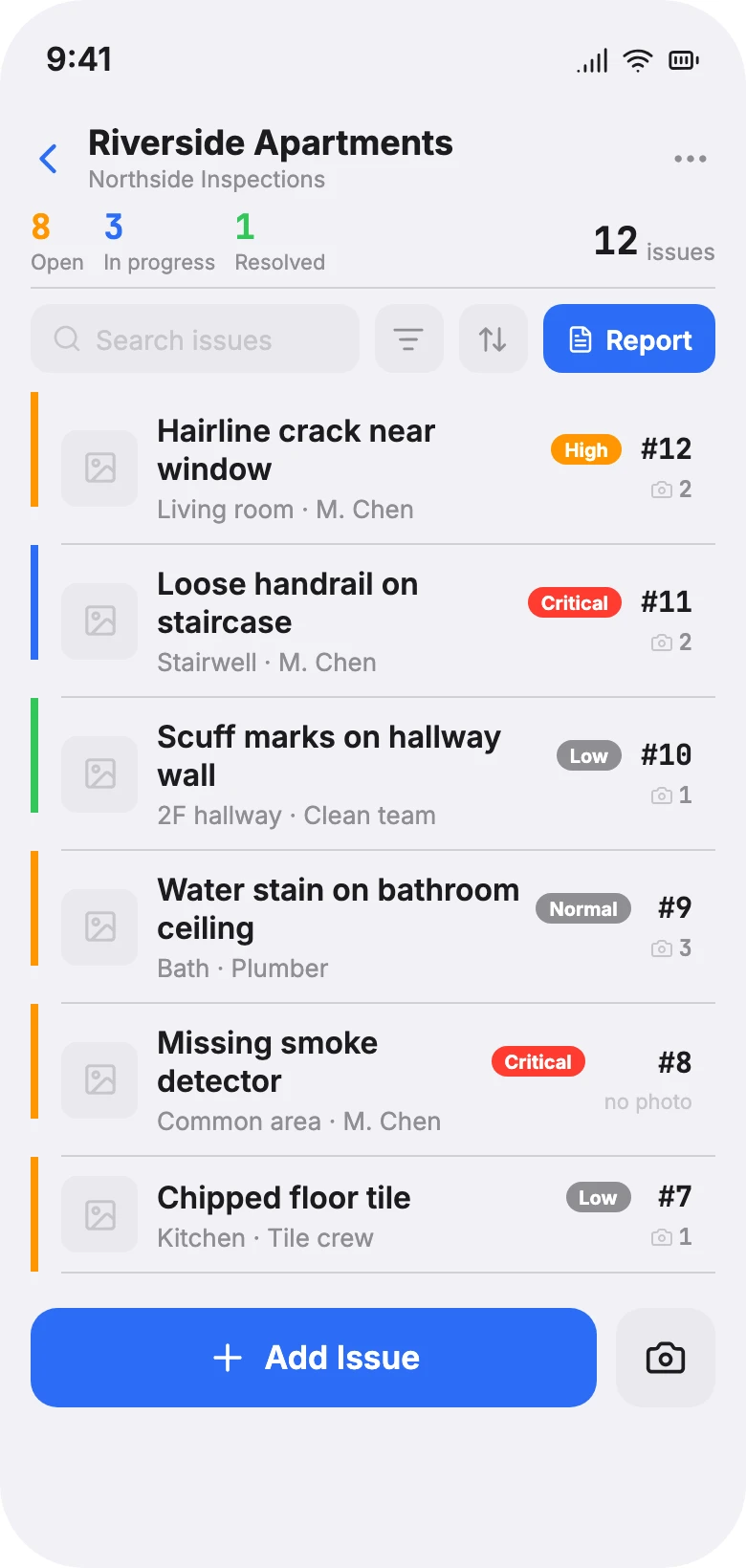
IssueFolio issue list: each issue shows a photo, title, status, and assignee with a numbered count.

Capture

Capture issues in seconds.

A title is all you need to save an issue. Add a location, assignee, status, and priority only when they matter, then save and immediately start the next one. Optional fields never get in the way.

  • Status as Open, In Progress, or Resolved
  • Priority from Low to Critical
  • Duplicate the last issue and swap the photos
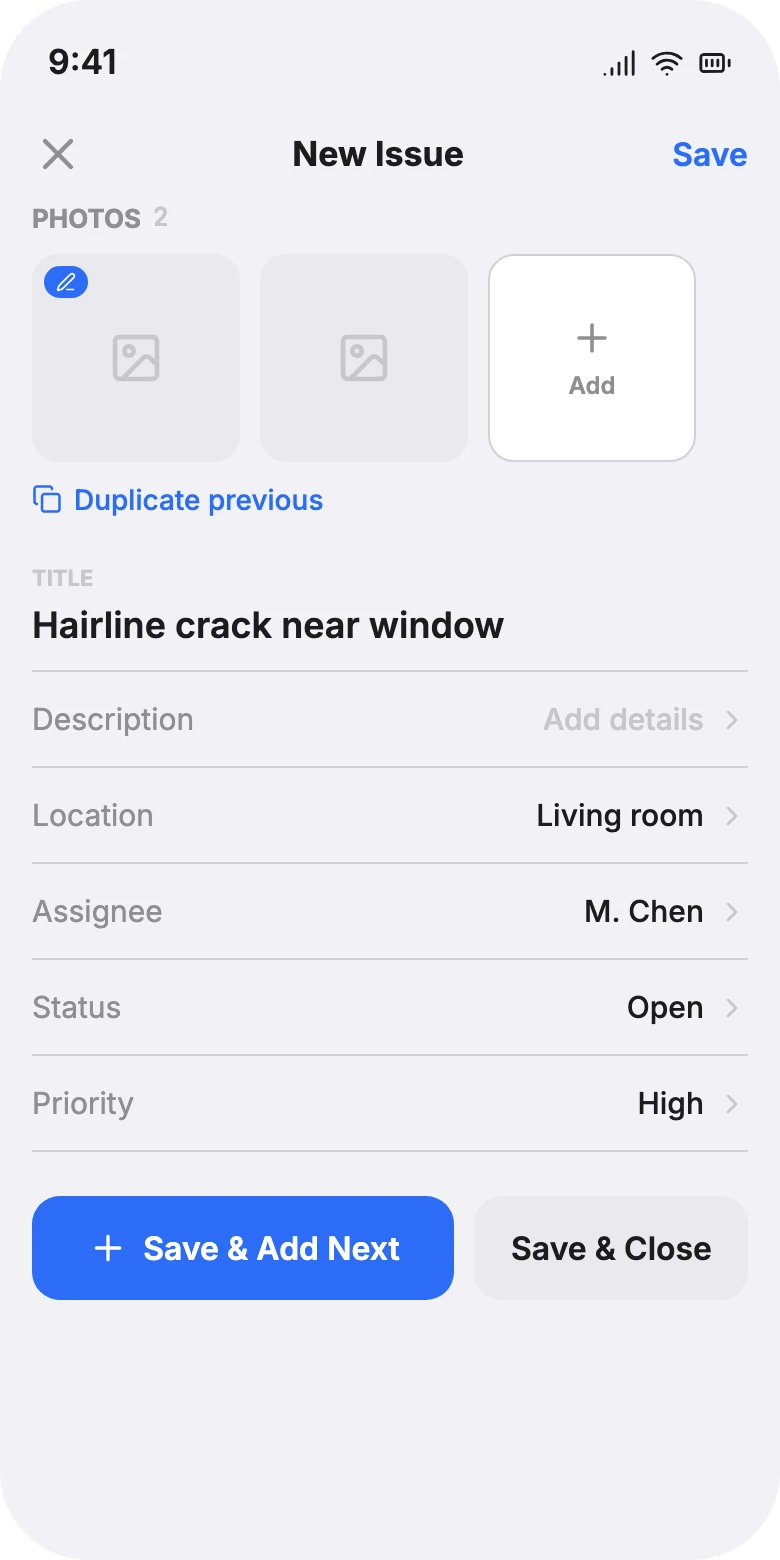
Issue editor: a title and description with several attached photos shown as a horizontal strip.

Photos

Every photo stays with its issue.

Take photos in a continuous run or import them from your library. Keep several photos with the same issue, reorder them by drag, and never lose track of which note belongs to which picture.

  • Camera and photo-library import
  • Drag to reorder; multi-select to delete
  • Originals preserved alongside the report copy
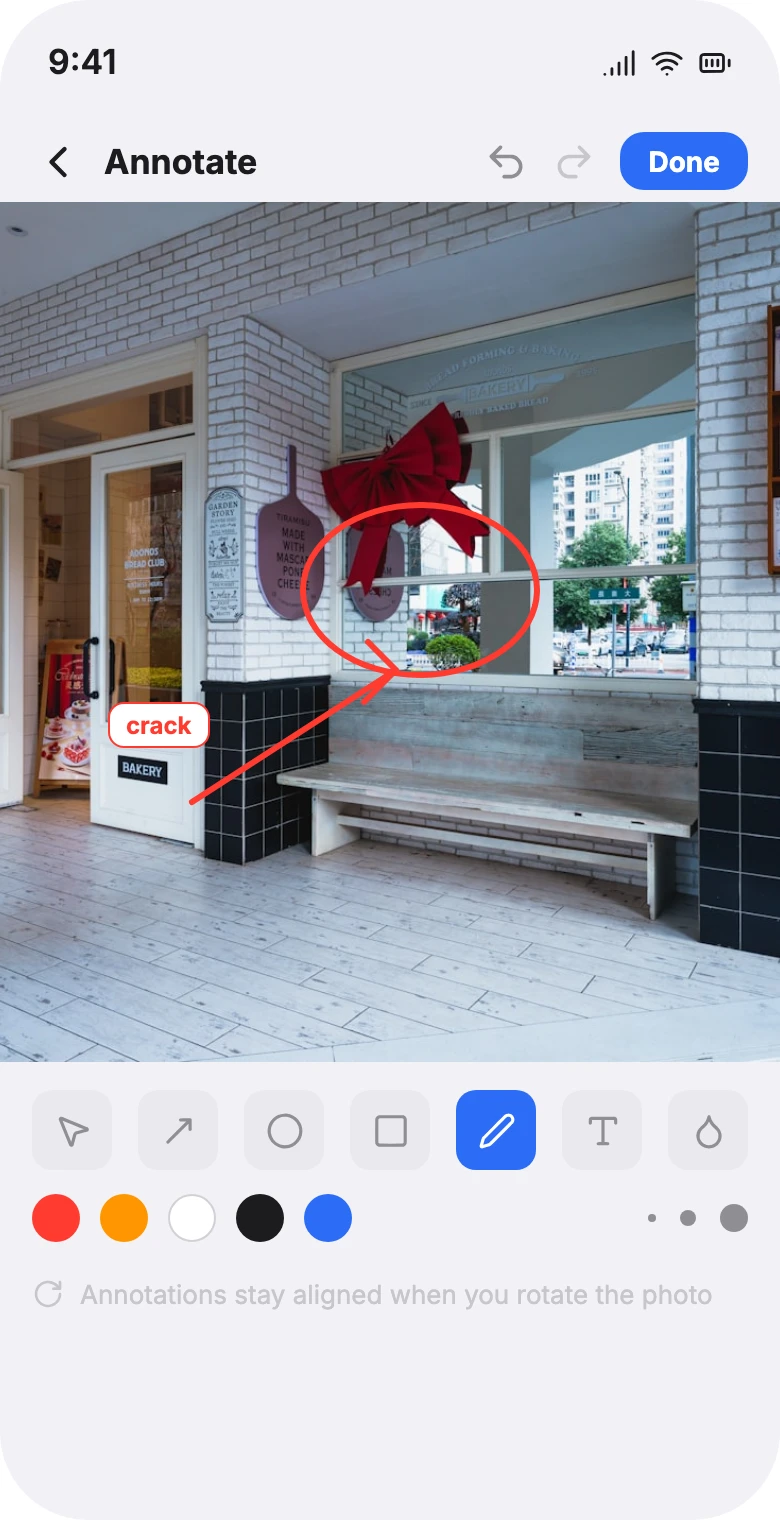
Photo annotation tools: pen, marker, lasso, eraser and text, with a circle drawn around a defect.

Markup

Mark up exactly what matters.

Draw arrows, circles, and freehand, or add text and blur. Point straight at the problem so there's no confusion about what needs fixing. Your original photo is always kept intact, separate from the markup.

  • Pen, marker, lasso, eraser, and text
  • Color and stroke width you control
  • Full undo and redo history
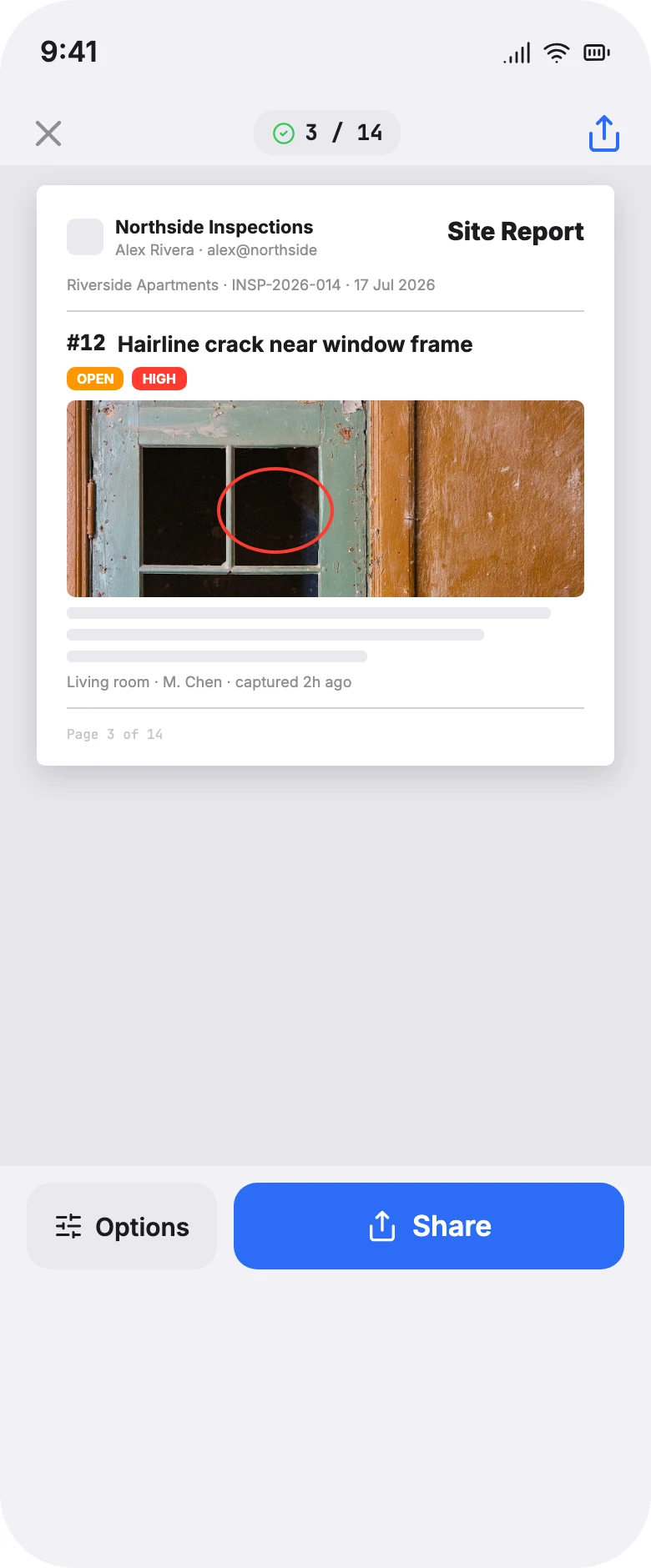
PDF report preview: a branded cover with project details, then numbered issue pages with photos and annotations.

Export

Export a report that looks finished.

Pick from four report templates, drop in your company logo and a handwritten signature, and IssueFolio lays out project details, numbered issues, photos, and annotations as a clean, branded PDF. Detailed or compact, A4 or US Letter. Share it straight from your phone.

  • Four report templates, previewed before export
  • Handwritten signature, logo, and cover
  • A4 or US Letter, share from your phone

The flow

Three steps, start to signed-off.

  1. 01

    Capture

    Walk the site. Log issues and add photos as you go; a title is enough to save and move on.

  2. 02

    Organize

    Mark up photos, set assignees and status, and reorder issues to tell the story clearly.

  3. 03

    Deliver

    Preview the result, then export a branded PDF and share it with your client, before you leave.

Who it's for

Made for the work that happens on site.

Generic fields: title, description, location, assignee, status, priority, and photos, so it fits your work without locking you into someone else's workflow.

Construction

Site, defect & snag reports

Daily site reports, defect and snag lists, and handover punch lists, photographed, owned, and delivered in one pass.

Property & inspection

Move-in, move-out & routine

Tenancy condition records, scheduled inspections, and maintenance requests with photos that stay tied to each item.

Facilities & maintenance

Work orders & damage logs

Document damage, raise work orders, and keep before-and-after records that prove the work was done.

Cleaning & installation

Quality checks & sign-off

Capture completion quality, flag remediation items, and hand over a clean, signed report on the spot.

Why IssueFolio

A spreadsheet can't format itself. An enterprise platform is overkill.

Spreadsheets + camera roll
Inspection SaaS
IssueFolio
Works offline
~
No account required
Photos stay tied to each issue
~
Photo markup built in
Branded PDF, ready to send
~
Price
Free, but your time
Monthly subscription
$9.99 once
Your data, exportable
~

Pricing

Simple, honest pricing.

No subscription. No account. Your data is never held hostage: even on the free plan, you can always export a full project backup.

Free

$0

Everything you need to finish your first report.

  • 1 active project
  • 3 watermark-free PDF exports
  • Unlimited issues & photos
  • Full photo markup
  • Project backup export
Download · Free
Recommended

Pro

$9.99 one-time

Pay once. Keep it forever, on all your devices.

  • Unlimited projects
  • Unlimited PDF exports
  • All PDF layouts & branding
  • Company logo & signature
  • Restore purchase on a new phone
Get Pro · $9.99

Prices in USD. Launch pricing may apply. No ads, no tracking, no cloud dependency.

Questions

Before you download.

Do I need an account or an internet connection?

No. IssueFolio works fully offline and never asks you to create an account. Your projects live on your device.

What's included in the free version?

One active project, three watermark-free PDF exports, and every field for capturing issues, photos, and details. You can always export a full project backup, free or Pro.

Is it a subscription?

No. Pro is a one-time $9.99 purchase — unlimited projects and exports, on your devices, for as long as you use it. Restore it when you switch phones.

Where is my data stored?

On your device, by default. Nothing is uploaded to a server. Backups are exportable files that you control and keep.

Will it work for my kind of work?

Yes. The fields are generic — title, description, location, assignee, status, priority, and photos — so it fits construction, property inspections, maintenance, cleaning, punch lists, and more without imposing a workflow.

Can I add my company logo and signature?

Yes. Set them once as defaults and override them per project. Reports carry your branding on every page, and you can hide the signature when you don't need it.

Can it handle a big report?

It's built for it. Capture dozens of issues and scores of photos; the PDF renders in a streaming pass, so a 20-issue, 40-photo report finishes in a few seconds.

Which devices are supported?

iPhone, running iOS 17 or newer. Android isn't available yet — it's on the roadmap.

What's the catch?

There isn't one. No account, no cloud dependency, no ads, no subscription. Try the full flow for free, and pay once if you want unlimited reports.

Finish today's report before you leave the site.

Download IssueFolio free. Your first professional field report is minutes away, with no account required.

Free to download · Works offline · One-time Pro, no subscription